Base64 sits in an awkward but essential place in modern computing. It does not hide information, compress it, or prove anything about it. It simply gives raw bytes a printable body so they can move through systems that expect text.
A Quiet Workhorse of Text-Shaped Infrastructure
Every day, enormous amounts of binary data pass through systems that were not really designed to carry raw binary data.
Images travel inside emails. Certificates sit inside text files. Authentication tokens move through HTTP headers. Encrypted bytes are placed into JSON. Small icons are embedded directly into CSS. Public keys are copied from terminals, pasted into dashboards, and stored in configuration files. Somewhere in the background, again and again, Base64 is doing its quiet work.
Base64 is not a cipher in the strict sense. It does not hide a message from an enemy. It does not use a secret key. It does not provide confidentiality, authentication, or integrity.
And yet it belongs very naturally beside cryptography.
It belongs there because real cryptographic systems do not live only as clean mathematical ideas. They have to travel through files, emails, browsers, APIs, databases, certificates, terminals, URLs, logs, and command-line tools. The output of cryptography is often not friendly text. It is raw bytes: signatures, ciphertexts, hashes, nonces, compressed blobs, random tokens, private keys, public keys, certificate structures, encrypted payloads.
Those bytes need to be stored somewhere. Copied somewhere. Sent somewhere. Printed somewhere. Sometimes they need to pass through machinery that expects ordinary text.
That is where Base64 enters.
Base64 is a binary-to-text encoding system. It takes arbitrary bytes and represents them using a limited alphabet of printable characters. The result often looks like nonsense:
TWFueSBoYW5kcyBtYWtlIGxpZ2h0IHdvcmsu
But it is not random nonsense. It is structured, reversible, and deliberately boring.
Decode it, and you get:
Many hands make light work.
The point is not secrecy. The point is survival.
Base64 is the packaging layer. It is the printable wrapper around awkward bytes. It is one of those small, unglamorous systems that became indispensable because it sits exactly on the boundary between binary computers and text-shaped infrastructure.
It is not the lock.
It is the box the lock is shipped in.
A Strange-Looking String With a Very Ordinary Job
Base64 strings have a particular look: dense blocks of uppercase letters, lowercase letters, digits, sometimes slashes, sometimes plus signs, and often one or two equals signs at the end.
Something like:
U29tZSBiaW5hcnkgZGF0YSBoYXMgdG8gdHJhdmVsIGFzIHRleHQu
To someone unfamiliar with it, this can look vaguely cryptographic. It has the visual atmosphere of secrecy. It is unreadable at a glance. It appears compressed, technical, perhaps even protected.
But Base64 is not trying to defeat an attacker.
It is trying to defeat incompatibility.
The problem it solves is simple: some systems are comfortable with text but uncomfortable with arbitrary bytes.
That sounds like an old problem, and historically it is. Early communication systems, especially email, were built around text. Many systems assumed 7-bit ASCII. Certain byte values could be interpreted as control characters, line breaks, terminators, escape sequences, or special instructions. Raw binary data could be corrupted, truncated, altered, or rejected.
But the problem never entirely disappeared. Modern software is still full of text-shaped containers:
- JSON
- XML
- HTML
- CSS
- URLs
- cookies
- email bodies
- HTTP headers
- environment variables
- configuration files
- log files
- PEM files
- command-line arguments
These are not always good places to put raw binary data.
Base64 gives programmers a reliable compromise. Convert the bytes into text. Move the text through the awkward system. Decode it back into the original bytes on the other side.
It is not elegant. It is not space-efficient. It is not beautiful.
But it works.
That is why it is everywhere.
Not Encryption, Not Compression, Not Hashing
Base64 is often misunderstood because it changes the appearance of data.
If a person sees this:
SGVsbG8gd29ybGQ=
and does not know how to decode it, it can feel secret.
But once decoded, it simply says:
Hello world
There is no key. There is no cryptographic protection. There is no difficulty in reversing it.
This distinction matters enough to state plainly:
Base64 is encoding, not encryption.
Encoding changes representation. Encryption protects information from people who do not have the key.
Base64 is also not compression. In fact, it usually makes data larger. Every three bytes of input become four Base64 characters, which means the encoded form is roughly one third larger than the original.
Nor is Base64 hashing. A hash is one-way: you cannot recover the original message from a secure hash digest. Base64 is deliberately reversible.
So Base64 does not belong in the same category as AES, RSA, SHA-256, or ChaCha20.
It belongs closer to hexadecimal, Base32, URL encoding, ASCII armor, and other representation systems.
That said, Base64 often appears beside real cryptography. A public key may be Base64-encoded. A digital certificate may contain Base64. A signed web token may use Base64URL. An encrypted message may be encoded as Base64 so it can be pasted into an email, stored in JSON, or displayed in a terminal.
In those cases, Base64 is not the security mechanism.
It is the carrier.
The lock is elsewhere.
The Basic Idea: Turn Bytes Into Safe Characters
Computers work with bytes. A byte has 8 bits, and therefore 256 possible values:
0 through 255
Some byte values correspond to ordinary printable characters. Others do not. A byte might represent part of an image, part of a compressed archive, part of an encrypted file, a null byte, a control character, or something that a text-based system does not want to handle directly.
Base64 solves this by using a restricted alphabet of 64 printable symbols:
ABCDEFGHIJKLMNOPQRSTUVWXYZabcdefghijklmnopqrstuvwxyz0123456789+/
That gives:
26uppercase letters26lowercase letters10digits2extra symbols:+and/
Together:
26 + 26 + 10 + 2 = 64
There is also a padding character:
=
The padding character is not part of the 64-value alphabet. It is used at the end to show that the final block of data did not divide neatly into the usual size.
The genius of Base64 is not that these characters are especially attractive. They are not. A long Base64 string is ugly to read and unpleasant to edit by hand.
The genius is that these characters are widely survivable. They can pass through many systems that might mishandle raw binary data.
That makes Base64 a practical diplomatic language between binary systems and text systems.
Why the Number 64?
The number 64 is not arbitrary.
64 = 2^6
That means one Base64 character can represent exactly six bits of information.
This is the central trick.
Normal bytes contain eight bits. Base64 takes the original stream of bytes, joins the bits together, and cuts them into groups of six. Each six-bit group has a value from 0 to 63. That value is then mapped to one of the 64 Base64 characters.
So the process is:
- take
8-bit bytes - join their bits into a continuous stream
- split that stream into
6-bit chunks - map each
6-bit chunk to a printable character
The cleanest block size is three bytes.
Three bytes contain 24 bits:
3 x 8 = 24
Base64 splits those 24 bits into four chunks of six:
4 x 6 = 24
So the natural conversion is:
3 bytes -> 4 Base64 characters
That is why Base64 has its famous size penalty. Four output characters are needed to carry three original bytes.
In ordinary storage, those four characters take four bytes, so the encoded data is about 33% larger than the original.
That sounds wasteful, and it is. But it is still much more compact than some alternatives. Hexadecimal, for example, represents each byte using two characters, doubling the size. Base64 is uglier to inspect than hex, but more compact.
Base64 is a compromise between safety and efficiency.
It gives up some space so the data can travel more reliably through text-based systems.
The Alphabet: A Small Table That Can Carry Any Data
The standard Base64 alphabet maps numbers from 0 to 63 onto printable characters.
| Value range | Characters |
|---|---|
0-25 |
A to Z |
26-51 |
a to z |
52-61 |
0 to 9 |
62 |
+ |
63 |
/ |
So:
| Value | Character |
|---|---|
0 |
A |
1 |
B |
2 |
C |
25 |
Z |
26 |
a |
27 |
b |
51 |
z |
52 |
0 |
61 |
9 |
62 |
+ |
63 |
/ |
The choice is partly historical, partly practical, and partly mathematical.
Letters and digits are widely safe. The final two characters are more awkward because there are not many printable symbols that are safe everywhere. Standard Base64 uses + and /, but these can be troublesome in URLs and filenames.
That is why Base64URL exists.
In Base64URL:
| Standard Base64 | Base64URL |
|---|---|
+ |
- |
/ |
_ |
This version appears in web tokens, URL parameters, filenames, and other places where ordinary Base64 characters might cause problems.
The existence of Base64URL is a useful reminder: Base64 is not one mystical universal alphabet. It is a family of closely related encodings built around the same 6-bit idea.
The alphabet adapts to the environment.
The mechanism stays the same.
A Worked Example: Man Becomes TWFu
The standard demonstration uses the word:
Man
This is a good example because it contains exactly three characters. In ASCII or UTF-8, those characters are three bytes.
The byte values are:
| Character | Decimal | Binary |
|---|---|---|
M |
77 |
01001101 |
a |
97 |
01100001 |
n |
110 |
01101110 |
Now join the three bytes into one 24-bit stream:
01001101 01100001 01101110
Remove the spaces:
010011010110000101101110
Now split into four groups of six bits:
010011 010110 000101 101110
Convert those binary groups into decimal:
| 6-bit group | Decimal |
|---|---|
010011 |
19 |
010110 |
22 |
000101 |
5 |
101110 |
46 |
Now look up each decimal value in the Base64 alphabet:
| Decimal | Base64 character |
|---|---|
19 |
T |
22 |
W |
5 |
F |
46 |
u |
So:
Man -> TWFu
Nothing has been hidden. Nothing has been compressed. The bits have simply been regrouped and represented using a different alphabet.
That is Base64 in miniature.
A 24-bit block is taken apart into four 6-bit pieces. Each piece becomes a printable character. The original bytes can be recovered exactly by reversing the process.
Padding: Why Base64 Strings Often End With Equals Signs
The example above works perfectly because Man is three bytes long.
But what if the input is not a multiple of three bytes?
Base64 still works, but it has to pad the final block.
Take:
Ma
That is only two bytes:
| Character | Binary |
|---|---|
M |
01001101 |
a |
01100001 |
Together:
01001101 01100001
That is 16 bits. Base64 wants to work in 6-bit chunks. Sixteen bits gives two full 6-bit chunks, with four bits left over. The encoder pads the remaining space with zero bits to form another 6-bit group.
The output becomes:
TWE=
The = tells the decoder that one byte was missing from the final three-byte block.
Now take a one-byte input:
M
The byte is:
01001101
This becomes:
TQ==
The two equals signs tell the decoder that two bytes were missing from the final three-byte block.
So the pattern is:
| Original final block | Base64 padding |
|---|---|
3 bytes |
no padding |
2 bytes |
one = |
1 byte |
two == |
The equals signs do not represent secret data. They are bookkeeping.
Some systems omit padding when the length can be inferred. This is especially common in Base64URL, including some web-token formats. But traditional Base64 uses padding to make the encoded length a multiple of four characters.
That “multiple of four” pattern is one of the visual clues that a string may be Base64.
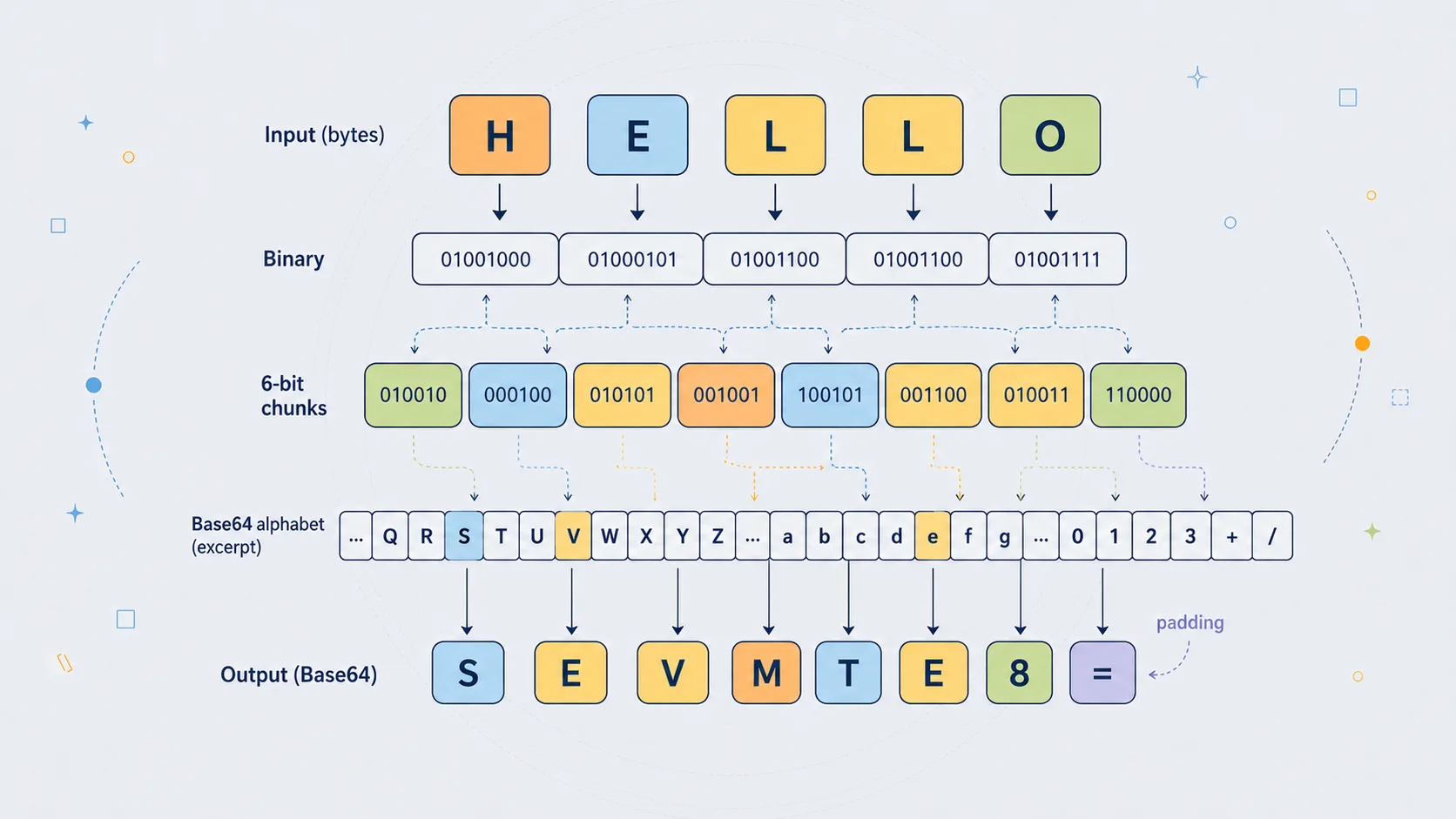
A Second Example: Why Hello Ends With Padding
The word:
Hello
is a useful example because it is five bytes long.
In ASCII or UTF-8:
| Character | Decimal | Binary |
|---|---|---|
H |
72 |
01001000 |
e |
101 |
01100101 |
l |
108 |
01101100 |
l |
108 |
01101100 |
o |
111 |
01101111 |
Base64 works most cleanly in groups of three bytes.
So Hello splits into:
Hel
and:
lo
The first group, Hel, contains three bytes and encodes normally.
The second group, lo, contains only two bytes, so it needs one padding character.
The full Base64 result is:
SGVsbG8=
The final = appears because the input length leaves a two-byte remainder.
This is a useful case because it shows that padding is not mysterious. It is simply a consequence of Base64's three-byte grouping.
If the message had been:
Hell
that would be four bytes: one full three-byte group plus one leftover byte. It would need two padding characters.
If the message had been:
Hello!
that would be six bytes: exactly two full three-byte groups. No padding would be needed.
So the presence or absence of = is not meaningful in a cryptographic sense. It does not say whether the message is important. It does not say whether the content is text, image data, encrypted data, or anything else.
It only tells you how the byte length fitted into Base64's block size.
Why Base64 Became Necessary
Base64's history is tied to the older internet, especially email.
Early email was not designed for the modern world of attachments, rich documents, embedded images, non-English text, cryptographic signatures, and arbitrary binary files. It was built around text. SMTP, the basic mail transfer protocol, came from a world where messages were expected to be mostly plain ASCII.
That created an awkward problem.
What happens if you want to send an image?
An image file is not plain text. Its bytes may contain values that old mail systems could alter, reject, or interpret incorrectly. Some systems were not “8-bit clean”, meaning they could not safely preserve all possible 8-bit byte values in transit.
Base64 offered a solution.
Before sending the file, convert its bytes into printable text. Send that text through the mail system. At the other end, decode the text back into the original file.
This is why Base64 became closely associated with MIME email attachments. MIME extended email so that different kinds of content could be included in messages, and Base64 became one of the standard ways to carry binary attachments safely.
This older history still matters because modern software inherits many text-shaped habits from earlier systems.
Even now, when we no longer live in a purely 7-bit world, we still constantly place data inside text formats. JSON, XML, HTML, CSS, and URLs are everywhere. If binary data has to fit inside one of them, Base64 is often the simplest answer.
Base64 survived because the old problem changed shape rather than disappearing.
The world became more modern, but the boundary between binary and text remained.
Email, Certificates, Tokens, and the Web
Base64 is not a specialised curiosity. It is one of the everyday formats of practical computing.
You find it in places where binary data must be represented in a text-friendly way.
Email Attachments
This is the classic use.
A file attachment is binary data. Email bodies historically travelled through text-oriented systems. Base64 made it possible to encode the attachment as text, send it safely, and decode it at the receiving end.
The user usually never sees this. The email client handles it automatically.
Behind the simple act of attaching a file is a translation step: binary object into safe text, safe text back into binary object.
PEM Certificates and Keys
Many cryptographic files use a text wrapper around Base64-encoded binary data.
For example:
-----BEGIN CERTIFICATE-----
Then a large block of Base64 text.
Then:
-----END CERTIFICATE-----
The readable boundary lines tell software what kind of object is being stored. The Base64 block carries the underlying binary certificate data.
Public keys, private keys, certificate signing requests, and other cryptographic structures are often stored this way.
This is one of the reasons Base64 belongs near cryptography. It is how cryptographic material is often packaged.
It is not doing the cryptographic work.
It is making the cryptographic object portable.
JSON Web Tokens
JWTs commonly use Base64URL.
A typical JWT has three dot-separated sections:
header.payload.signature
The header and payload are Base64URL-encoded JSON. The signature is also encoded so it can travel as text.
This leads to a common misunderstanding. The readable parts of many JWTs are not secret. They can be decoded by anyone. The security comes from the signature, not from the Base64URL encoding.
Base64URL makes the token portable.
The signature makes tampering detectable.
Those are very different jobs.
Data URLs
Base64 is often used to embed small binary assets directly into HTML or CSS.
For example, an image can be included as:
data:image/png;base64,...
This means the image data itself is written inside the document, rather than stored as a separate file.
That can be useful for small icons or self-contained examples. But it also increases file size and makes source code harder to read. For larger assets, separate files are usually better.
Data URLs are one of the places where Base64 is highly visible to web developers. A tiny icon turns into a wall of encoded text. Useful, but not especially pretty.
APIs and JSON
JSON does not have a native binary type. It has strings, numbers, booleans, arrays, objects, and null.
So if an API needs to send binary data inside JSON, it often Base64-encodes the bytes and places the result in a string.
That might be used for:
- small images
- encrypted blobs
- signatures
- file chunks
- authentication data
- binary identifiers
- compressed payloads
Again, Base64 is not the main event. It is the wrapper that lets the data fit into a text format.
The Security Trap: Encoded Does Not Mean Safe
Base64 creates one of the most common beginner mistakes in security.
A person sees something unreadable and assumes it must be protected.
But unreadable is not the same as secure.
This:
cGFzc3dvcmQxMjM=
decodes to:
password123
There is no cracking involved. No clever attack. No secret. Just decoding.
This matters in real systems. Developers sometimes store API keys, passwords, credentials, or configuration values in Base64 and think they have added a security layer. They have not.
Base64 can obscure something from immediate casual viewing, but that is all. It is closer to writing a word in an unfamiliar notation than locking it in a safe.
The correct rule is simple:
If anyone can reverse it without a secret key, it is not encryption.
Base64 has no secret key.
That does not make Base64 bad. It means it must be used for the right job.
Use Base64 to represent bytes as text.
Do not use Base64 to protect secrets.
Base64 in Malware and Security Analysis
Base64 also appears in cybersecurity work, especially in the analysis of scripts, malware, suspicious commands, and encoded payloads.
Attackers often use Base64 to make commands less readable at first glance. A command that says:
download this file, execute this script, contact this server
is easy for a defender to spot.
A Base64-encoded version looks like a block of meaningless text.
PowerShell is a common example because it has an encoded command option. This feature has legitimate uses, but attackers also abuse it to hide commands from casual inspection or simple filters.
That does not make Base64 a strong hiding method. Analysts can decode it quickly. But it is enough to slow down a first glance, clutter logs, or bypass crude keyword detection.
Security professionals therefore learn to recognise Base64-like strings.
Common signs include:
- long strings of letters and numbers
- occasional
+and/ - one or two
=signs at the end - length often divisible by four
- no spaces
- a high concentration of mixed uppercase and lowercase letters
However, not every such string is Base64, and not every Base64 string decodes to readable text. It might decode to compressed data, encrypted data, binary shellcode, an image, or another encoded layer.
The key lesson is that Base64 is often a clue, not an answer.
It says: there may be bytes hidden behind this printable surface.
Decoding Base64: No Cryptanalysis Required
A cipher has to be broken.
Base64 only has to be decoded.
The decoding process reverses the encoding process:
- take each Base64 character
- convert it back to its 6-bit value
- join those 6-bit values into a bitstream
- split the stream into 8-bit bytes
- use padding to remove artificial bytes from the final block
For example:
TWFu
maps back to:
| Character | Value | Binary |
|---|---|---|
T |
19 |
010011 |
W |
22 |
010110 |
F |
5 |
000101 |
u |
46 |
101110 |
Join the bits:
010011010110000101101110
Split into bytes:
01001101 01100001 01101110
Convert those bytes back to characters:
M a n
So:
TWFu -> Man
The process is exact. Base64 is lossless. If the input data is encoded and decoded correctly, the output bytes are the same as the original bytes.
This is why it is useful for files and cryptographic data. It does not approximate or reinterpret the data. It preserves the bytes.
That is also why Base64 should not be described as “breaking” or “cracking”. There is no security barrier to overcome. There is only a reversible representation to undo.
When Decoded Output Looks Like Garbage
A common mistake is expecting every decoded Base64 string to become readable text.
Sometimes it does. If the original input was plain text, decoding will produce plain text.
But Base64 can encode any bytes, including:
- images
- PDFs
- ZIP files
- encrypted messages
- compressed data
- executable files
- audio files
- cryptographic keys
- random bytes
If you decode a Base64-encoded PNG image and try to view the result as text, it will look like garbage. That does not mean the decoding failed. It means the original data was not text.
This is especially important in cryptography. A secure ciphertext should look random. If encrypted bytes are Base64-encoded and then decoded, the result should still look like random binary data. That is normal.
Base64 makes binary data printable.
It does not make binary data meaningful to human eyes.
A readable Base64 decode usually means the original data was text. An unreadable decode may still be perfectly correct.
Base64 and Unicode: The Byte Layer Matters
Base64 works on bytes, not directly on human characters.
This sounds like a small technical distinction, but it matters.
Text such as:
Hello
can be converted to bytes very simply in ASCII or UTF-8.
But text such as:
café
or:
£50
or:
漢字
or:
🙂
requires a character encoding such as UTF-8. Some characters take more than one byte.
So the correct pipeline is:
text -> bytes -> Base64
Then, when decoding:
Base64 -> bytes -> text
If the wrong character encoding is used, the recovered text may be broken.
This is why some JavaScript Base64 functions can be awkward with Unicode. Older browser functions such as btoa() and atob() are historically oriented around binary strings. Modern Unicode text often needs explicit conversion to and from UTF-8 bytes.
The principle is easy to remember:
Base64 does not know what a letter is.
It only knows bytes.
This is also why Base64 can encode anything. It does not care whether the bytes represent a poem, a photograph, a certificate, an encrypted message, or random noise. The meaning of the bytes belongs to another layer.
Base64's job is simply to preserve them.
Base64URL: The Web-Friendly Variant
Standard Base64 uses +, /, and sometimes =.
Those characters can cause trouble in URLs.
In a URL, / separates path segments. + can be interpreted as a space in some contexts. = is often used in query parameters. These characters can still be included if escaped properly, but escaping makes strings longer and messier.
Base64URL avoids the problem by changing the alphabet slightly:
| Standard Base64 | Base64URL |
|---|---|
+ |
- |
/ |
_ |
Padding with = is sometimes omitted.
This variant is common in web systems because it produces strings that are easier to place in URLs, filenames, tokens, and identifiers.
You will often encounter Base64URL in:
- JWTs
- OAuth-related systems
- signed URLs
- API tokens
- web-safe identifiers
- compact encoded payloads
The underlying idea is still Base64. The alphabet is just adapted for a different environment.
This is typical of encoding systems. They are shaped not only by mathematics, but by the awkward details of where the encoded text has to live.
A character that is harmless in an email body may be inconvenient in a URL. A character that is fine in a file may be awkward in HTML. Base64URL is simply Base64 wearing web-safe clothing.
Base64 Compared With Hexadecimal
Hexadecimal is another common way to represent binary data as text.
Hex uses 16 symbols:
0123456789abcdef
Each hex character represents four bits. Two hex characters represent one byte.
For example, the ASCII bytes for Man are:
| Character | Decimal | Hex |
|---|---|---|
M |
77 |
4d |
a |
97 |
61 |
n |
110 |
6e |
So:
Man
in hex is:
4d616e
In Base64, the same text is:
TWFu
Hex is easier to inspect because each byte is clearly visible as two characters. That makes it popular for debugging, memory dumps, hashes, colour values, and cryptographic fingerprints.
But hex is larger. It doubles the size of data.
Base64 is more compact. It expands data by about 33%, not 100%.
So the trade-off is:
| Encoding | Main advantage | Main disadvantage |
|---|---|---|
| Hex | Easy to read byte-by-byte | Large |
| Base64 | More compact | Harder to inspect manually |
Both are useful. They simply serve slightly different needs.
If you are debugging raw bytes by eye, hex is often better.
If you are moving binary data through a text field, Base64 is often more efficient.
Base32, Base85, and Other Relatives
Base64 belongs to a wider family of binary-to-text encodings.
Base32
Base32 uses 32 symbols. Since:
32 = 2^5
each Base32 character represents five bits.
Base32 is less compact than Base64, but it can be easier to handle in systems where case-insensitivity or human transcription matters. Some Base32 alphabets avoid visually confusing characters.
You may see Base32 in authenticator app secrets and other systems where people may need to copy or type values manually.
Base85
Base85 uses a larger alphabet and is more efficient than Base64. It can encode four bytes into five characters, giving around 25% overhead rather than 33%.
That sounds better, but the larger alphabet creates practical problems. More symbols means more characters that may be unsafe in markup, strings, shells, URLs, or text formats.
Base85 is useful in some contexts, but Base64 won the broader popularity contest because it is simpler and safer across more systems.
Quoted-Printable
Quoted-printable is another MIME encoding. It is designed mainly for text that is already mostly readable, but contains occasional characters that need escaping.
Base64 is better for arbitrary binary data.
Quoted-printable is often better for text with only a few awkward characters.
ASCII Armor
ASCII armor is not exactly one encoding. It is a general idea: wrap binary data in printable text, often with header and footer lines.
OpenPGP messages and PEM files are examples of this style.
The visible wrapper tells you what kind of object you are looking at. Base64 often carries the data inside.
This is why a cryptographic object may look like text, even though the actual structure underneath is binary.
What Base64 Is Good For
Base64 is good when binary data must pass through a text environment.
Good uses include:
- storing binary data in JSON
- sending attachments through email
- representing certificates in PEM format
- embedding small images in HTML or CSS
- carrying binary tokens in APIs
- displaying keys or signatures in a copyable form
- avoiding delimiter collisions in text formats
- placing encrypted bytes inside text-only systems
It is also good for interoperability. Almost every programming language can encode and decode Base64. That makes it a convenient common language between systems.
If one program writes Base64 and another reads Base64, they do not need to agree on much else. They can pass the string around as ordinary text.
This universal support is one of Base64's greatest strengths.
A boring standard that everyone understands is often more useful than a cleverer format that nobody supports.
Base64 is not exciting because it is obscure.
It is useful because it is common.
What Base64 Is Bad For
Base64 is bad when it is used as a substitute for proper security.
It should not be used to protect:
- passwords
- API keys
- private keys
- confidential messages
- personal data
- authentication secrets
- sensitive configuration files
Encoding a secret does not make it safe.
Base64 is also bad when used unnecessarily on large files. If a system can carry binary data directly, that is usually better. Base64 adds size and processing overhead.
For example, embedding a tiny icon as a Base64 data URL may be reasonable. Embedding a large image gallery that way is usually a mistake.
Base64 can also make logs, source files, and configuration files unpleasant to read. A page full of long encoded blobs is technically text, but not human-friendly text.
The best use of Base64 is deliberate and limited.
Use it when the environment needs text.
Avoid it when raw bytes are already supported.
Common Mistakes With Base64
Base64 is simple, but it attracts a surprising number of errors. Most of them come from confusing representation with meaning.
Mistake 1: Thinking Base64 Is Encryption
This is the big one.
If a value can be decoded by anyone without a secret key, it is not encrypted.
Base64 can make data look less obvious, but it provides no real protection.
Mistake 2: Storing Passwords in Base64
A Base64-encoded password is still effectively plain text.
This:
c2VjcmV0LXBhc3N3b3Jk
is not secure simply because it looks unreadable.
Passwords should be hashed with a proper password-hashing algorithm, such as bcrypt, scrypt, Argon2, or PBKDF2, depending on the system and requirements.
Base64 is not a password storage method.
Mistake 3: Expecting Every Decode to Produce Readable Text
Base64 can encode any bytes. If the original data was an image, ZIP file, encrypted blob, or random token, the decoded output will not look like ordinary text.
That does not mean the decode failed.
It may mean the decoded bytes need to be saved as a file or handled by another program.
Mistake 4: Confusing Standard Base64 With Base64URL
Standard Base64 uses + and /.
Base64URL uses - and _.
If the wrong decoder is used, strings may fail or decode incorrectly unless converted first.
This matters especially with JWTs and web tokens.
Mistake 5: Forgetting That Base64 Works on Bytes
Text must become bytes before Base64 encoding.
Bytes must become text after Base64 decoding.
When Unicode is involved, the character encoding matters. UTF-8 is usually the right choice, but the main point is that there is always a byte layer underneath.
Mistake 6: Using Base64 for Large Data Without Need
Base64 adds size. If binary transfer is available, it is usually better to send the bytes directly.
Base64 is useful when the environment requires text.
It is wasteful when the environment already handles binary safely.
Mistake 7: Assuming Padding Is Always Present
Some Base64 variants omit = padding.
That does not automatically mean the string is invalid. It may be a padless variant, especially in web contexts.
However, some decoders expect padding and may need it restored before decoding.
These mistakes are not exotic. They are ordinary developer mistakes, and they happen because Base64 sits in an awkward place. It looks technical enough to be mistaken for security, but its real job is much simpler.
A Simple Python Example
Python has built-in Base64 support through the base64 module.
Here is a simple example using text:
import base64

message = "Many hands make light work."

# Text must first become bytes.
message_bytes = message.encode("utf-8")

# Encode the bytes as Base64.
encoded_bytes = base64.b64encode(message_bytes)

# Convert the Base64 bytes into a readable ASCII string.
encoded_text = encoded_bytes.decode("ascii")

print(encoded_text)

# Decode the Base64 string back into bytes.
decoded_bytes = base64.b64decode(encoded_text)

# Convert the bytes back into text.
decoded_text = decoded_bytes.decode("utf-8")

print(decoded_text)
This prints:
TWFueSBoYW5kcyBtYWtlIGxpZ2h0IHdvcmsu
Many hands make light work.
The important detail is the movement between text and bytes.
This line:
message.encode("utf-8")
turns text into bytes.
This line:
base64.b64encode(message_bytes)
turns bytes into Base64.
Then decoding reverses the process:
base64.b64decode(encoded_text)
gives the original bytes back.
Finally:
decoded_bytes.decode("utf-8")
turns those bytes back into text.
That is the full cycle:
text -> bytes -> Base64 -> bytes -> text
This byte step is not decorative. It is central to understanding Base64 properly.
Encoding and Decoding a File in Python
Base64 is not only for text. In fact, its most important use is often binary data.
Here is how to encode an image file:
import base64

with open("image.png", "rb") as file:
    image_bytes = file.read()

encoded_text = base64.b64encode(image_bytes).decode("ascii")

with open("image-base64.txt", "w", encoding="ascii") as file:
    file.write(encoded_text)
The "rb" mode means “read binary”.
That matters because an image is not text. Python should not try to interpret it as characters. It should read the raw bytes.
To decode the Base64 text back into an image:
import base64

with open("image-base64.txt", "r", encoding="ascii") as file:
    encoded_text = file.read()

image_bytes = base64.b64decode(encoded_text)

with open("restored-image.png", "wb") as file:
    file.write(image_bytes)
The "wb" mode means “write binary”.
If everything has been done correctly, restored-image.png will contain the same bytes as the original image.
This demonstrates the real purpose of Base64 more clearly than a text example does. Base64 lets something non-textual live temporarily as text, then return to its original binary form.
That temporary disguise is the whole trick.
A Small Educational Encoder
The standard library is what you should use in real programs. But it is useful to see the mechanism in a simple form.
This small encoder shows the essential process:
Python exampleShow code
BASE64_ALPHABET = "ABCDEFGHIJKLMNOPQRSTUVWXYZabcdefghijklmnopqrstuvwxyz0123456789+/"

def simple_base64_encode(data: bytes) -> str:
    result = ""

    for i in range(0, len(data), 3):
        block = data[i:i + 3]

        # Convert up to three bytes into one integer.
        value = int.from_bytes(block, byteorder="big")

        # If the block has fewer than three bytes, shift it left
        # so it still occupies the correct position in a 24-bit group.
        missing_bytes = 3 - len(block)
        value <<= 8 * missing_bytes

        # Extract four 6-bit values.
        indexes = [
            (value >> 18) & 0b111111,
            (value >> 12) & 0b111111,
            (value >> 6) & 0b111111,
            value & 0b111111,
        ]

        chars = [BASE64_ALPHABET[index] for index in indexes]

        # Apply padding if the final block was short.
        if missing_bytes == 1:
            chars[-1] = "="
        elif missing_bytes == 2:
            chars[-1] = "="
            chars[-2] = "="

        result += "".join(chars)

    return result


print(simple_base64_encode(b"Man"))
print(simple_base64_encode(b"Ma"))
print(simple_base64_encode(b"M"))
print(simple_base64_encode(b"Hello"))
The output is:
TWFu
TWE=
TQ==
SGVsbG8=
This code is deliberately plain. It shows the moving parts:
- take up to three bytes
- form a
24-bit block - extract four
6-bit values - map those values to the Base64 alphabet
- add padding if necessary
That is all Base64 really is.
The production version in Python's base64 module is faster, safer, and better tested. But the underlying logic is the same.
This is also why Base64 is so easy to implement across languages. It is not a deep algorithm. It is a disciplined bit-packing scheme with a lookup table.
Why Base64 Still Matters
Base64 is old, but it is not obsolete.
The reason is simple: modern systems still constantly cross the boundary between binary and text.
A cryptographic signature is binary. A JSON document is text.
A certificate structure is binary. A PEM file is text.
An image is binary. A CSS file is text.
An encrypted blob is binary. An environment variable is text.
A random token may be binary. A URL is text-like.
Base64 survives because those boundaries are everywhere.
It is not a grand cryptographic invention. It is not intellectually dramatic in the way that Enigma, RSA, or AES are dramatic. But it has a practical importance that is hard to overstate.
It keeps bytes intact when bytes have to travel through places built for characters.
That is why it appears in cryptography, web development, email, malware analysis, APIs, certificates, authentication systems, and data formats. Not because it is secure, but because secure systems still need packaging.
Cryptography produces important bytes.
Base64 helps those bytes move.
The Wrapper, Not the Secret
Base64 is easy to underestimate because it does not do anything glamorous.
It does not defeat codebreakers. It does not conceal secrets. It does not compress data into a smaller form. It does not prove identity or prevent tampering.
Its job is humbler and more mechanical.
It lets bytes survive inside text.
That job sounds small until you notice how much of modern computing depends on exactly that trick. Email attachments, certificates, web tokens, API payloads, embedded images, cryptographic keys, signed messages, configuration values, and suspicious malware commands all rely on the same basic movement from raw bytes to printable characters and back again.
Base64 is therefore best understood as infrastructure.
Not the message.
Not the lock.
Not the proof.
The wrapper.
And sometimes the wrapper is what allows the real system to function.