Not every encoding is trying to be as short as possible.
Sometimes the real problem is not simply "How do we turn binary data into text?" Sometimes the harder question is how to turn binary data into text that can survive old systems, case-insensitive environments, URLs, DNS labels, filenames, printed recovery codes, manual entry, copy-paste, and software that treats punctuation as dangerous.
That is where Base32 earns its place.
Base32 is a binary-to-text encoding system. Like Base64, it takes raw bytes and turns them into printable characters. But Base32 makes a different trade-off. It is less compact than Base64, but its usual alphabet is deliberately conservative:
ABCDEFGHIJKLMNOPQRSTUVWXYZ234567
No lowercase letters are required. No +. No /. No spaces. No punctuation, apart from optional = padding at the end.
That small difference matters more than it first appears.
A Base64 string may be efficient, but it can be awkward in URLs, filenames, old systems, command lines, configuration files, case-insensitive environments, and places where punctuation has special meaning. Base32 gives up some compactness so the resulting text is plainer, more restricted, and often easier to carry through hostile or fussy systems.
A Base32 string might look like this:
KRXWWZLOOMQHG5LSOZUXMZJAMF3WW53BOJSCA43ZON2GK3LTFY======
Decoded as UTF-8 text, that becomes:
Tokens survive awkward systems.
At first glance, the encoded version looks vaguely secret. It is dense, artificial, and not readable as ordinary English.
But Base32 is not encryption.
It does not hide a message from an attacker. It does not use a secret key. It does not provide confidentiality, authentication, tamper resistance, or integrity. Anyone who knows the encoding can reverse it.
Its job is humbler and more practical.
Base32 takes bytes and writes them using a small, text-safe alphabet. It is a packaging system. A transport form. A way of making binary data survive in places where raw bytes do not belong.
That is why it belongs naturally beside cryptography, even though it is not itself a cipher.
Real cryptographic systems produce bytes: keys, signatures, hashes, nonces, encrypted payloads, random secrets, recovery values, certificate material, authentication seeds, and tokens. Those bytes often need to be displayed, copied, typed, scanned, stored in configuration files, placed in databases, inserted into URLs, or carried through systems that expect text.
Base32 is one of the formats that helps those bytes move.
It is not the lock.
It is not the secret.
It is the carefully labelled envelope.
A Strange-Looking String With a Practical Job
Base32 strings have a distinctive appearance. They are usually made from uppercase letters and the digits 2 through 7, sometimes ending with one or more equals signs:
IFBEGRCFIZDUQSKKJNGE====
To someone unfamiliar with encodings, this can look cryptographic. It has the visual style of hidden information. It might look like a token, a secret code, or a piece of encrypted data.
But Base32 is not trying to defeat a reader.
It is trying to avoid troublesome characters.
The basic problem is old, but still extremely relevant: computers often need to move binary data through systems that prefer text. Some places are uncomfortable with arbitrary bytes. Some are uncomfortable with punctuation. Some are case-insensitive. Some are designed around identifiers, labels, environment variables, URLs, filenames, printed codes, or manually entered values.
Base32 solves a specific version of the binary-to-text problem.
It says: use a small alphabet made of capital letters and a few digits. Avoid symbols such as +, /, %, &, ?, #, quotes, spaces, control characters, and other characters that might be misread, escaped, removed, or given special meaning.
The result is larger than Base64, but often easier to move through awkward environments.
That makes Base32 useful in contexts such as:
- authenticator app secrets
- one-time password setup strings
- DNS-compatible encodings
- case-insensitive systems
- recovery codes and manual entry systems
- text-only configuration files
- random identifiers and tokens
- systems where punctuation is inconvenient
- binary data that must be printed, typed, scanned, or copied
Base32 is not beautiful. Long Base32 strings are bulky and monotonous. They are not pleasant to read.
But they are deliberately plain.
That plainness is the point.
Encoding, Not Encryption
Base32 is often misunderstood for the same reason Base64 is misunderstood: it changes how data looks.
For example, this:
JBSWY3DPEB3W64TMMQ======
looks obscure.
Decoded, it simply says:
Hello world
There is no secret key. There is no hard mathematical problem. There is no protection.
Base32 is encoding, not encryption.
Encoding changes representation.
Encryption protects information from people who do not have the key.
That distinction matters.
Base32 is also not compression. It normally makes data larger. In standard RFC 4648 Base32, five bytes of input become eight Base32 characters. Since each output character is usually stored as one byte of text, the encoded data is about 60% larger than the original binary input.
Base32 is also not hashing. A secure hash is one-way: given the digest, you should not be able to recover the original message. Base32 is deliberately reversible.
So Base32 does not belong in the same category as AES, RSA, SHA-256, ChaCha20, or Argon2.
It belongs closer to:
- Base64
- hexadecimal
- Base58
- Base85
- URL encoding
- ASCII armor
- Crockford Base32
- Bech32-style encodings
Base32 often appears near real security systems, but it is not the security mechanism itself.
A two-factor authentication secret may be Base32-encoded. A binary identifier may be converted into Base32 so it can be copied safely. DNSSEC-related material may use a Base32 variant so it can fit inside DNS-compatible labels. A random byte string may be represented as Base32 because it is easier to type than raw binary or symbol-heavy text.
In those cases, the security comes from something else: randomness, a cryptographic algorithm, a secret key, a signature, a hash function, or a verification process.
Base32 is just how the bytes are written down.
The Basic Idea: Turn Bytes Into a Conservative Alphabet
Computers work with bytes. A byte has 8 bits, so it can hold 256 possible values:
0 through 255
Some byte values correspond to printable characters. Others do not. A byte might represent part of an image, a compressed archive, an encrypted message, a null byte, a control character, a random token, or data that cannot be safely pasted into a text field.
Base32 solves this by representing arbitrary bytes using 32 printable symbols.
The standard RFC 4648 Base32 alphabet is:
ABCDEFGHIJKLMNOPQRSTUVWXYZ234567
That gives:
| Group | Characters | Count |
|---|---|---|
| Uppercase letters | A-Z |
26 |
| Digits | 2-7 |
6 |
| Total | A-Z and 2-7 |
32 |
There is also a padding character:
=
The equals sign is not one of the 32 data symbols. It is used at the end of a Base32 string to show that the final group of bytes did not divide neatly into Base32's natural block size.
The alphabet is intentionally cautious. It avoids lowercase letters in the standard output form. It avoids 0 and 1, which can be confused with O, I, or L in some fonts. It avoids punctuation that may be inconvenient in URLs, filenames, shells, configuration files, and text-based protocols.
That is the character of Base32: less compact, but often less troublesome.
It is a format built not for glamour, but for survival.
Why the Number 32?
The number 32 is not arbitrary.
32 = 2^5
That means one Base32 character can represent exactly five bits of information.
This is the central trick.
Bytes contain eight bits. Base32 takes the original stream of bytes, joins the bits together, and cuts the stream into groups of five. Each five-bit group has a value from 0 to 31. That value is then mapped to one of the 32 Base32 characters.
The process is:
- take 8-bit bytes
- join their bits into one continuous stream
- split that stream into 5-bit chunks
- map each 5-bit value to a printable character
The cleanest block size is five bytes.
Five bytes contain 40 bits:
5 x 8 = 40
Base32 splits those 40 bits into eight chunks of five:
8 x 5 = 40
So the natural conversion is:
5 bytes -> 8 Base32 characters
This is why Base32 has a larger size penalty than Base64.
Base64 turns three bytes into four characters. That is about 33% overhead.
Base32 turns five bytes into eight characters. That is about 60% overhead.
The trade-off looks like this:
| Encoding | Bits per character | Natural block | Approximate overhead |
|---|---|---|---|
| Hexadecimal | 4 bits | 1 byte -> 2 chars | 100% |
| Base32 | 5 bits | 5 bytes -> 8 chars | 60% |
| Base64 | 6 bits | 3 bytes -> 4 chars | 33% |
| Base85 | about 6.4 bits | 4 bytes -> 5 chars | 25% |
Base32 is not chosen because it is the shortest.
It is chosen because its alphabet is restricted and convenient.
It gives up space to gain character safety.
The Standard Base32 Alphabet
The RFC 4648 Base32 alphabet maps values from 0 to 31 onto characters.
| Value range | Characters |
|---|---|
| 0-25 | A to Z |
| 26-31 | 2 to 7 |
The full mapping is:
| Value | Character | Value | Character |
|---|---|---|---|
| 0 | A | 16 | Q |
| 1 | B | 17 | R |
| 2 | C | 18 | S |
| 3 | D | 19 | T |
| 4 | E | 20 | U |
| 5 | F | 21 | V |
| 6 | G | 22 | W |
| 7 | H | 23 | X |
| 8 | I | 24 | Y |
| 9 | J | 25 | Z |
| 10 | K | 26 | 2 |
| 11 | L | 27 | 3 |
| 12 | M | 28 | 4 |
| 13 | N | 29 | 5 |
| 14 | O | 30 | 6 |
| 15 | P | 31 | 7 |
The use of digits 2 through 7 is one of the things that makes Base32 visually distinctive.
There is no 0.
There is no 1.
There are no lowercase letters in the standard written form.
There are no punctuation marks except optional padding at the end.
This makes Base32 feel cleaner than Base64 in some contexts. A standard Base64 string may contain + and /, which can become awkward in URLs, filenames, command lines, and configuration formats. Base32 avoids that problem by using a smaller, more conservative alphabet.
The cost is length.
Base32 strings are chunky.
But they are often easier to tolerate in unfriendly environments.
A Worked Example: "foo" Becomes "MZXW6==="
A common Base32 example is the word:
foo
In ASCII or UTF-8, this is three bytes.
| Character | Decimal | Binary |
|---|---|---|
f |
102 | 01100110 |
o |
111 | 01101111 |
o |
111 | 01101111 |
Join the three bytes into one bitstream:
01100110 01101111 01101111
Remove the spaces:
011001100110111101101111
Base32 works in five-bit groups, so split the stream like this:
01100 11001 10111 10110 1111
The last group has only four bits. Base32 pads it with a zero bit to form a full five-bit value:
01100 11001 10111 10110 11110
Now convert each five-bit group into decimal:
| 5-bit group | Decimal |
|---|---|
01100 |
12 |
11001 |
25 |
10111 |
23 |
10110 |
22 |
11110 |
30 |
Now map each value to the Base32 alphabet:
| Decimal | Base32 character |
|---|---|
| 12 | M |
| 25 | Z |
| 23 | X |
| 22 | W |
| 30 | 6 |
So the data characters are:
MZXW6
But Base32 output is traditionally padded so that the encoded length is a multiple of eight characters. Since foo produces five Base32 characters, three padding characters are added:
MZXW6===
Nothing has been hidden. Nothing has been encrypted. The bits have simply been regrouped into five-bit pieces and written using a 32-symbol alphabet.
That is Base32 in miniature.
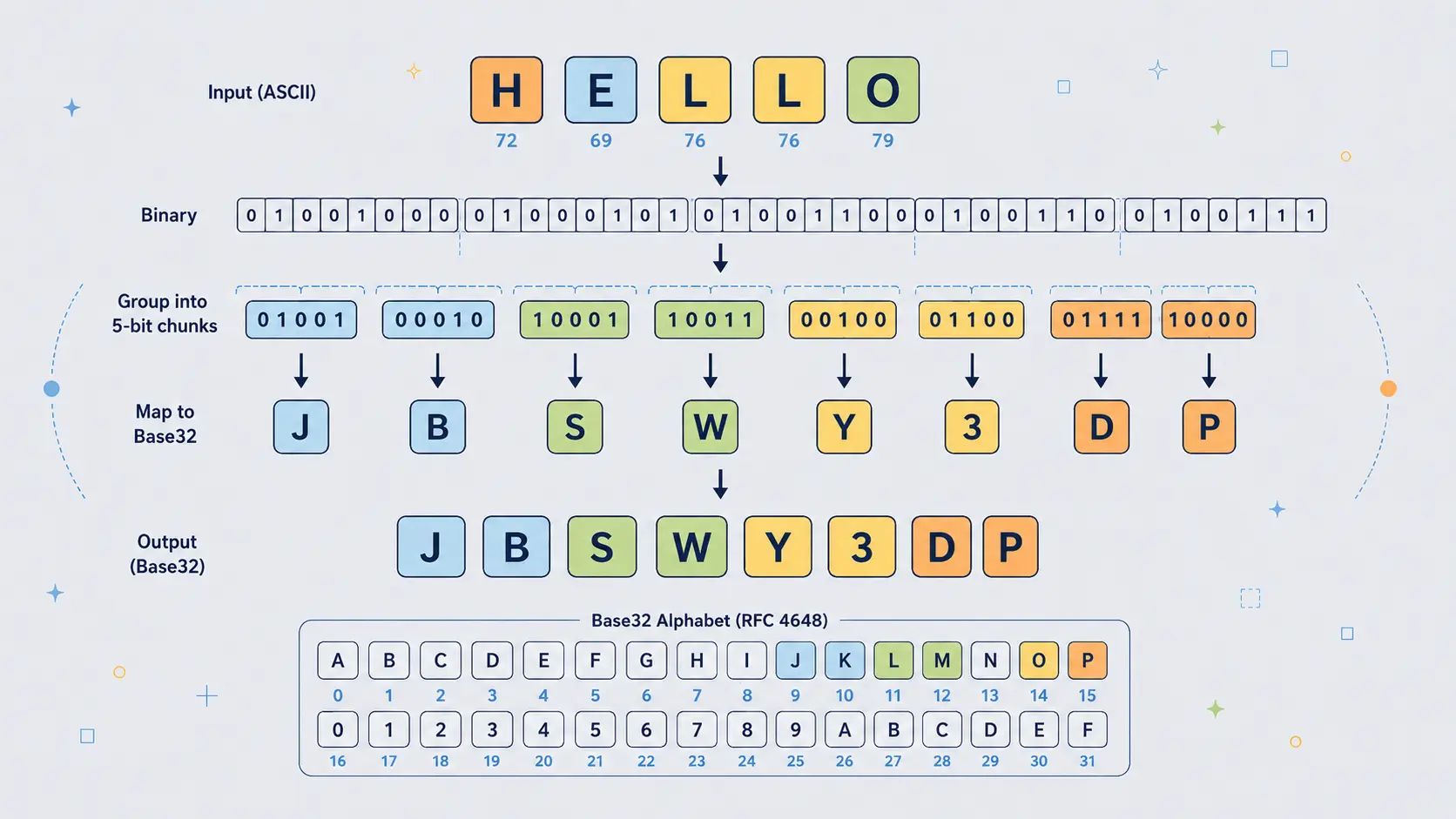
Why "Hello" Becomes "JBSWY3DP"
The word:
Hello
is a particularly clean Base32 example because it is exactly five bytes long.
| Character | Decimal | Binary |
|---|---|---|
H |
72 | 01001000 |
e |
101 | 01100101 |
l |
108 | 01101100 |
l |
108 | 01101100 |
o |
111 | 01101111 |
Five bytes contain exactly 40 bits:
01001000 01100101 01101100 01101100 01101111
Base32 divides those 40 bits into eight groups of five bits:
01001 00001 10010 10110 11000 11011 00011 01111
Those groups become decimal values:
| 5-bit group | Decimal | Base32 character |
|---|---|---|
01001 |
9 | J |
00001 |
1 | B |
10010 |
18 | S |
10110 |
22 | W |
11000 |
24 | Y |
11011 |
27 | 3 |
00011 |
3 | D |
01111 |
15 | P |
So:
Hello
becomes:
JBSWY3DP
No padding is needed because the input length is exactly five bytes.
That makes Hello for Base32 rather like Man for Base64: a compact example where the input fits perfectly into the encoding's natural block size.
Padding: Why Base32 Can End With So Many Equals Signs
Base32 padding looks more dramatic than Base64 padding.
Base64 strings may end with one or two equals signs.
Base32 strings can end with six, four, three, or one equals signs, depending on how many bytes are left in the final block.
That is because Base32 works most cleanly in five-byte blocks:
5 bytes -> 8 Base32 characters
But not every input length is a multiple of five.
When the final block contains fewer than five bytes, the encoder adds zero bits to complete the final five-bit group and then adds = characters so the output length is a multiple of eight.
The padding pattern is:
| Final input block | Data bits | Base32 data chars | Padding |
|---|---|---|---|
| 5 bytes | 40 bits | 8 chars | none |
| 4 bytes | 32 bits | 7 chars | = |
| 3 bytes | 24 bits | 5 chars | === |
| 2 bytes | 16 bits | 4 chars | ==== |
| 1 byte | 8 bits | 2 chars | ====== |
So Base32 padding can look strange if you are used to Base64.
For example:
| Text | Base32 |
|---|---|
f |
MY====== |
fo |
MZXQ==== |
foo |
MZXW6=== |
foob |
MZXW6YQ= |
fooba |
MZXW6YTB |
foobar |
MZXW6YTBOI====== |
The equals signs are not secret information. They are bookkeeping.
They help the decoder understand how the final byte group was completed.
Some systems omit padding when the length can be inferred. This is common in authenticator setup secrets and in systems that want shorter, cleaner-looking strings. A decoder can often restore the missing padding if the unpadded length is valid, but tools differ.
The visual clue is simple:
Base32 often appears as uppercase letters and digits 2-7, with a length that may be padded to a multiple of eight.
Why Base32 Exists When Base64 Is Smaller
A fair question is: why use Base32 at all?
Base64 is more compact. It is more common. It has enormous support across programming languages, APIs, browsers, command-line tools, email systems, and cryptographic formats.
So why bother with Base32?
Because compactness is not always the only requirement.
Base32 has several practical advantages.
First, the standard alphabet avoids punctuation. There is no +, /, or _ in the RFC 4648 Base32 alphabet. That can make Base32 easier to place in systems where punctuation has special meaning.
Second, it is naturally uppercase. That makes it more convenient in systems that uppercase values or treat uppercase and lowercase as equivalent, provided the decoder is designed to accept case-insensitive input.
Third, it is more suitable for human transcription than Base64. It still is not perfect, but it avoids many symbols that are awkward to read aloud, copy, type, or paste.
Fourth, some environments are built around restricted alphabets. DNS labels, product codes, recovery codes, older systems, and identifiers may prefer letters and digits over punctuation-heavy strings.
Fifth, Base32 can be more robust in places where accidental case changes may occur. A Base64 string can be destroyed by changing case, because uppercase and lowercase letters represent different values. A Base32 system can be made case-insensitive more naturally.
The trade-off is simple:
| Encoding | Better when you want... |
|---|---|
| Base64 | Compact text representation of binary data |
| Base32 | Safer alphabet, easier copying, fewer punctuation problems |
| Hex | Maximum simplicity and byte-by-byte readability |
Base32 is not better than Base64 in every way.
It is better in certain awkward places.
That is why it survives.
Base32 in Authenticator Apps and TOTP Secrets
One of the most common places ordinary users encounter Base32 is in two-factor authentication setup.
When you add an account to an authenticator app, the setup may involve scanning a QR code. Behind that QR code is usually an otpauth:// URI. Inside that URI is often a shared secret, and that secret is commonly represented using Base32.
A secret might look like this:
JBSWY3DPEHPK3PXP
The authenticator app decodes that Base32 string back into bytes. Those bytes are then used as the shared secret for generating one-time codes.
This is an excellent example of Base32's real role.
The security does not come from Base32.
The security comes from the secret itself and from the HOTP or TOTP algorithm that uses it.
Base32 is simply the written form of the secret.
This distinction matters. If someone sees your authenticator secret in Base32 form, they do not need to "break" Base32. They can decode it, or they can often import the Base32 string directly into another authenticator app.
That is why two-factor setup secrets should be treated as sensitive.
Base32 may make the secret easier to print, scan, store, or type.
It does not make the secret safe to reveal.
Base32 and DNS-Safe Text
Base32 also appears around DNS because DNS names have historically had strict character expectations.
A normal DNS label is most comfortable with letters, digits, and hyphens. It is not a good place for arbitrary binary data. It is also not a good place for standard Base64 strings containing +, /, or padding characters.
Base32-like encodings are useful when binary values need to be represented in DNS-compatible text.
One important example is NSEC3 in DNSSEC. NSEC3 does not use the ordinary RFC 4648 Base32 alphabet. It uses a related variant called Base32hex, also known as the extended hex Base32 alphabet.
The reason is still easy to understand: binary hash output has to be written inside DNS names, and DNS names are text labels with character restrictions.
This is exactly the kind of environment where Base32-style encodings make sense.
The data is binary.
The container is text.
The alphabet must be conservative.
Base32 is not chosen because it is elegant. It is chosen because it fits.
Base32 for Identifiers, Recovery Codes, and Manual Entry
Base32 is also useful for identifiers and recovery values that may be copied by humans.
A random binary identifier might be efficient internally, but humans cannot handle raw bytes. Hexadecimal is easy, but long. Base64 is compact, but includes mixed case and punctuation. Base32 sits in the middle: longer than Base64, shorter than hex, and usually friendlier than symbol-heavy encodings.
For example, a system might generate random bytes and display them as Base32:
K5XW6ZDFMZTWQ2LK
That kind of string can be:
- printed on paper
- copied from a dashboard
- pasted into a configuration file
- read over the phone more easily than punctuation-heavy text
- stored in uppercase-only systems
- used in filenames or labels with fewer surprises
Base32 is not perfect for human use. Characters such as O and I can still be confusing in some fonts. This is one reason alternative alphabets exist, such as Crockford's Base32, which was designed specifically to reduce transcription errors.
But even standard RFC 4648 Base32 is often more manageable than Base64 when people or restricted systems are involved.
The general principle is:
- If machines are doing all the handling, Base64 is often better.
- If humans or restrictive text systems are involved, Base32 may be better.
RFC 4648 Base32, Base32hex, and Crockford Base32
When people say "Base32", they often mean the RFC 4648 version:
ABCDEFGHIJKLMNOPQRSTUVWXYZ234567
That is the version used by many software libraries and many authenticator-secret systems.
But it is not the only Base32 alphabet.
Base32 is really a family of encodings built around the same five-bit idea.
Different variants use different alphabets and sometimes different rules.
| Variant | Alphabet style | Typical reason for use |
|---|---|---|
| RFC 4648 Base32 | A-Z followed by 2-7 |
Standard software interoperability |
| Base32hex | 0-9 followed by A-V |
DNSSEC, NSEC3, and hex-like ordering |
| Crockford Base32 | Human-friendly alphabet | Manual entry and reduced character confusion |
| z-base-32 | Human-oriented alphabet | Usability and compact-looking human transcription |
Crockford's Base32 is especially interesting because it was designed with human beings in mind. It avoids some confusing characters and allows certain ambiguous characters to be treated as equivalent when decoding.
For example, a human-friendly decoder may accept pairs such as:
depending on the rules of the variant.
The larger point is important: Base32 is not one single alphabet handed down from heaven.
It is a design pattern.
The shared idea is five-bit grouping.
The alphabet can change depending on the needs of the system.
For a general encoder/decoder tool, RFC 4648 Base32 is the safest default because it is the standard version most programmers expect.
But when reading documentation, always check which Base32 variant is meant.
A string valid in one variant may not decode correctly in another.
Base32 Compared With Base64
Base32 and Base64 solve similar problems, but with different priorities.
Base64 uses 64 symbols, so each character carries six bits.
Base32 uses 32 symbols, so each character carries five bits.
That one-bit difference per character has practical consequences.
Base64 is more compact:
3 bytes -> 4 Base64 characters
Base32 is larger:
5 bytes -> 8 Base32 characters
For the same input, Base32 output is usually noticeably longer.
For example:
Plain text: Hello
Base64: SGVsbG8=
Base32: JBSWY3DP
Plain text: Many hands make light work.
Base64:
TWFueSBoYW5kcyBtYWtlIGxpZ2h0IHdvcmsu
Base32:
JVQW46JANBQW4ZDTEBWWC23FEBWGSZ3IOQQHO33SNMXA====
Base64 is shorter, but it uses a more complicated alphabet:
ABCDEFGHIJKLMNOPQRSTUVWXYZabcdefghijklmnopqrstuvwxyz0123456789+/
Standard Base32 uses:
ABCDEFGHIJKLMNOPQRSTUVWXYZ234567
So the trade-off is:
| Feature | Base64 | Base32 |
|---|---|---|
| Bits per character | 6 | 5 |
| Size overhead | About 33% | About 60% |
| Uses lowercase | Yes | Not in standard output |
| Uses punctuation | Yes: + and / |
No, except padding = |
| URL-safe by default | No | Friendlier, though padding may still matter |
| Human transcription | Usually worse | Usually better |
| Common in email, JSON, certificates | Very common | Less common |
| Common in authenticator secrets | Less typical | Very common |
Base64 is the normal workhorse for compact binary-to-text encoding.
Base32 is the cautious alternative for environments where character safety, case handling, or human copying matters more.
Base32 Compared With Hexadecimal
Hexadecimal is another common way of representing bytes as text.
Hex uses 16 symbols:
0123456789abcdef
Each hex character represents four bits. Two hex characters represent one byte.
For example, the ASCII bytes for Hello are:
| Character | Decimal | Hex |
|---|---|---|
H |
72 | 48 |
e |
101 | 65 |
l |
108 | 6c |
l |
108 | 6c |
o |
111 | 6f |
So:
Hello
in hex is:
48656c6c6f
In Base32, the same text is:
JBSWY3DP
Hex is easier to inspect byte by byte. That makes it excellent for debugging, hashes, memory dumps, colour values, cryptographic fingerprints, and situations where humans want to see exact byte boundaries.
But hex is large. It doubles the size of the data.
Base32 is more compact than hex, but less visually direct.
| Encoding | Main advantage | Main disadvantage |
|---|---|---|
| Hex | Simple and byte-readable | 100% size overhead |
| Base32 | Conservative alphabet, less bulky than hex | Less compact than Base64 |
| Base64 | Compact and widely supported | Mixed case and punctuation |
Hex is often best for inspection.
Base32 is often better for copyable identifiers and conservative text environments.
Base64 is often better for compact transport.
None is universally best. Each is a different compromise.
The Security Trap: Encoded Does Not Mean Protected
Base32 can create a dangerous illusion.
This:
ONXW2ZLSNFXGOIDQMVZHG5LQ
looks technical enough to feel protected.
But the appearance is misleading. If the string decodes to a secret, the secret is not protected by Base32. It is merely represented in Base32.
This is especially important with authenticator secrets.
A Base32 TOTP secret should be treated as sensitive because it is the secret. The Base32 encoding does not protect it. It only makes it easier to store, scan, display, or type.
The rule is simple:
If anyone can reverse it without a secret key, it is not encryption.
Base32 has no secret key.
That does not make Base32 bad. It means it must be used for the right job.
Use Base32 to represent bytes as text.
Do not use Base32 to protect secrets.
If something needs confidentiality, encrypt it.
If something needs tamper detection, authenticate or sign it.
If something needs password storage, use a password-hashing algorithm.
Base32 is none of those things.
It is a notation.
Decoding Base32: No Cryptanalysis Required
A cipher has to be broken.
Base32 only has to be decoded.
The decoding process reverses the encoding process:
- take each Base32 character
- convert it back to its 5-bit value
- join those values into one bitstream
- split the bitstream into 8-bit bytes
- use padding to ignore artificial zero bits at the end
For example:
JBSWY3DP
maps back to:
| Character | Value | Binary |
|---|---|---|
J |
9 | 01001 |
B |
1 | 00001 |
S |
18 | 10010 |
W |
22 | 10110 |
Y |
24 | 11000 |
3 |
27 | 11011 |
D |
3 | 00011 |
P |
15 | 01111 |
Join the five-bit groups:
0100100001100101011011000110110001101111
Split into bytes:
01001000 01100101 01101100 01101100 01101111
Convert the bytes back to text:
Hello
So:
JBSWY3DP -> Hello
The process is exact. Base32 is lossless. If the input bytes are encoded and decoded correctly, the recovered bytes are the same as the original bytes.
This is why Base32 is useful for secrets, identifiers, keys, and binary data. It preserves the bytes. It does not interpret them.
It is also why Base32 should not be described as cracking or breaking.
There is no cryptographic barrier.
There is only a reversible representation.
When Decoded Output Looks Like Garbage
A common mistake is expecting every Base32 decode to produce readable text.
Sometimes it does. If the original input was ordinary UTF-8 text, decoding will produce ordinary text.
But Base32 can encode any bytes, including:
- random secrets
- encrypted messages
- hash output
- binary identifiers
- compressed data
- images
- files
- authentication seeds
- cryptographic keys
If you decode a Base32 authenticator secret and try to display the raw bytes as text, the result may look like nonsense. That does not mean the decoding failed. It may mean the original bytes were never meant to be read as text.
This is especially important in cryptography.
Secure random bytes should not look like English.
Encrypted bytes should not look like English.
Hash output should not look like English.
Base32 makes those bytes printable. It does not make them meaningful to human eyes.
A readable decode usually means the original data was text.
An unreadable decode may still be perfectly correct.
Base32 and Unicode: The Byte Layer Still Matters
Base32 works on bytes, not directly on human characters.
This sounds like a technical detail, but it matters.
Text such as:
Hello
can be converted to bytes very simply in ASCII or UTF-8.
But text such as:
café
or:
£50
or:
漢字
or:
🙂
requires a character encoding such as UTF-8. Some characters take more than one byte.
So the correct pipeline is:
text -> bytes -> Base32
Then, when decoding:
Base32 -> bytes -> text
If the wrong character encoding is used, the recovered text may be broken.
This is why a good Base32 text tool should explicitly encode text as UTF-8 before Base32 encoding, and decode the recovered bytes as UTF-8 when turning them back into text.
The principle is simple:
Base32 does not know what a letter is. It only knows bytes.
That is also why it can encode anything. It does not care whether the bytes represent a sentence, a PNG file, an encrypted blob, an authenticator secret, or random noise.
The meaning belongs to another layer.
Base32's job is to preserve the bytes in a safer textual form.
Base32 in Malware and Security Analysis
Base32 is less common than Base64 in malware and suspicious scripts, but it can still appear in security analysis.
Attackers and obfuscators use encodings to make data less obvious at first glance. A domain, command, payload, key, or configuration value may be encoded so that it does not appear as readable text in a script or binary.
Base64 is far more common for that kind of quick obfuscation because it is shorter and widely supported. But Base32 can be useful when the encoded material needs to fit into restricted character environments.
For example, Base32-like strings may appear in:
- DNS tunnelling or DNS-compatible payloads
- encoded identifiers
- obfuscated configuration
- malware-generated domain labels
- suspicious tokens
- data hidden inside uppercase alphanumeric strings
A Base32-like string may have these signs:
- mostly uppercase letters
- digits only from 2 to 7
- no spaces
- no punctuation except possible
=at the end - length often padded to a multiple of eight
- visual absence of
0,1,8, and9
But recognition is only a clue.
Not every uppercase alphanumeric string is Base32. Product keys, licence codes, IDs, hashes in custom alphabets, and random identifiers can look similar.
And not every Base32 decode will become readable text. It may decode to compressed data, encrypted bytes, random data, or another encoded layer.
The useful security habit is not to say, "This is definitely Base32."
The useful habit is to say, "This string has a Base32-like shape. Try decoding it, then inspect the resulting bytes."
What Base32 Is Good For
Base32 is good when binary data needs to become text, but the text needs to avoid awkward characters.
Good uses include:
- representing authenticator app secrets
- storing random tokens in a copyable form
- creating uppercase-friendly identifiers
- placing binary data in restricted text environments
- DNS-compatible encodings
- recovery codes and manual entry systems
- conservative configuration values
- cases where Base64 punctuation is inconvenient
- systems where accidental case changes may occur
It is also useful when the encoded value may be handled by humans. Base32 is not as compact as Base64, but it is often less annoying to type, copy, read aloud, or place in systems that reject punctuation.
A boring, restricted alphabet can be a major advantage.
Software is full of tiny traps: characters that need escaping, symbols that mean something special, fields that uppercase text, systems that dislike slashes, terminals that wrap lines, fonts that make characters ambiguous, and formats that were never designed for arbitrary bytes.
Base32 exists because those details matter.
What Base32 Is Bad For
Base32 is bad when compactness matters more than character safety.
It adds about 60% overhead, so large binary data becomes significantly bigger. If a system can carry binary directly, that is usually better. If a text encoding is needed but punctuation is acceptable, Base64 is usually more efficient.
Base32 is also bad when used as a fake security measure.
It should not be used to protect:
- passwords
- private keys
- API keys
- personal data
- confidential messages
- authentication secrets
- sensitive configuration values
Encoding a secret does not make it safe.
Base32 can also be clumsy for large blobs. A Base32-encoded file is long, monotonous, and unpleasant to inspect. For file attachments, JSON payloads, and general binary-to-text transport, Base64 is usually the normal choice unless there is a specific reason to prefer Base32.
The best use of Base32 is deliberate.
Use it when the restricted alphabet helps.
Avoid it when it only makes the data larger.
Common Mistakes With Base32
Base32 is simple, but it still attracts errors. Most of them come from confusing representation with meaning.
Mistake 1: Thinking Base32 Is Encryption
Base32 is reversible without a key.
That means it is not encryption.
If a value must remain secret, Base32 does not solve that problem.
Mistake 2: Treating Authenticator Secrets as Safe Because They Look Encoded
A TOTP secret written in Base32 is still the actual shared secret. Anyone who obtains it may be able to set up the same authenticator code generator.
The Base32 form is only a representation.
It must still be protected.
Mistake 3: Expecting Every Decode to Produce Readable Text
Base32 can encode any bytes. If the original data was random, encrypted, hashed, compressed, or binary, the decoded output may look meaningless.
That does not automatically mean the decode failed.
Mistake 4: Confusing Base32 Variants
RFC 4648 Base32, Base32hex, Crockford Base32, z-base-32, and other variants use different alphabets and sometimes different decoding rules.
A string valid in one system may not decode correctly in another.
Always check the expected variant.
Mistake 5: Mishandling Padding
Standard Base32 uses = padding so the output length is a multiple of eight characters.
Some systems omit padding.
A good decoder may restore missing padding when the length is valid, but not all tools behave the same way.
Mistake 6: Forgetting the Byte Layer
Text must become bytes before Base32 encoding. Bytes must become text after Base32 decoding.
For Unicode text, UTF-8 is usually the right bridge.
Base32 does not encode "letters" directly. It encodes bytes.
Mistake 7: Assuming Lowercase Always Works
Standard Base32 output is uppercase.
Some decoders accept lowercase input. Others are stricter.
In Python, for example, Base32 decoding is case-sensitive by default unless you explicitly enable case folding.
This matters when designing tools. A user-friendly tool may choose to accept lowercase input, but it should still explain that the standard output form is uppercase.
Mistake 8: Using Base32 When Base64 Would Be Better
Base32 is longer than Base64.
If the environment accepts Base64 safely, and humans do not need to type the value, Base64 may be the more practical option.
Base32 is a tool for certain constraints, not a universal improvement.
A Simple Python Example
Python's standard library includes Base32 support in the base64 module.
Here is a simple text example:
import base64

message = "Many hands make light work."

# Text must first become bytes.
message_bytes = message.encode("utf-8")

# Encode the bytes as Base32.
encoded_bytes = base64.b32encode(message_bytes)

# Convert the Base32 bytes into a readable ASCII string.
encoded_text = encoded_bytes.decode("ascii")

print(encoded_text)

# Decode the Base32 string back into bytes.
decoded_bytes = base64.b32decode(encoded_text)

# Convert the bytes back into text.
decoded_text = decoded_bytes.decode("utf-8")

print(decoded_text)
This prints:
JVQW46JANBQW4ZDTEBWWC23FEBWGSZ3IOQQHO33SNMXA====
Many hands make light work.
The important movement is:
text -> bytes -> Base32 -> bytes -> text
This line:
message.encode("utf-8")
turns text into bytes.
This line:
base64.b32encode(message_bytes)
turns bytes into Base32.
Then decoding reverses the process.
The byte step is not decorative. It is central to understanding Base32 properly.
Accepting Lowercase Input in Python
Python's Base32 decoder is strict by default. Lowercase input is not accepted unless you enable case folding.
For example:
import base64

encoded = "jbswy3dp"

decoded_bytes = base64.b32decode(encoded, casefold=True)

print(decoded_bytes.decode("utf-8"))
This prints:
Hello
The casefold=True option tells Python to accept lowercase letters as equivalent to uppercase letters.
This can be useful in user-facing tools, because people often paste or type values in inconsistent case.
However, a strict decoder may reject lowercase input, and some systems require the exact expected form.
That is another reason Base32 tools should be clear about which rules they are using.
Encoding and Decoding a File in Python
Base32 is not only for text. It can encode arbitrary binary files.
Here is how to encode an image file:
import base64

with open("image.png", "rb") as file:
    image_bytes = file.read()

encoded_text = base64.b32encode(image_bytes).decode("ascii")

with open("image-base32.txt", "w", encoding="ascii") as file:
    file.write(encoded_text)
The "rb" mode means "read binary".
That matters because an image is not text. Python should not try to interpret it as characters. It should read the raw bytes.
To decode the Base32 text back into an image:
import base64

with open("image-base32.txt", "r", encoding="ascii") as file:
    encoded_text = file.read()

image_bytes = base64.b32decode(encoded_text)

with open("restored-image.png", "wb") as file:
    file.write(image_bytes)
The "wb" mode means "write binary".
If everything has been done correctly, restored-image.png will contain the same bytes as the original image.
This demonstrates the real purpose of Base32. It lets non-text data exist temporarily as text, then return to its original binary form.
For large files, Base64 is usually more compact. But the principle is the same.
The text form is a wrapper.
The bytes are the real payload.
A Small Educational Base32 Encoder
In real programs, use the standard library. It is faster, safer, and better tested.
But a small educational encoder makes the mechanism easier to see.
Python exampleShow code
BASE32_ALPHABET = "ABCDEFGHIJKLMNOPQRSTUVWXYZ234567"


def simple_base32_encode(data: bytes) -> str:
    result = ""
    buffer = 0
    bits_left = 0

    for byte in data:
        buffer = (buffer << 8) | byte
        bits_left += 8

        while bits_left >= 5:
            index = (buffer >> (bits_left - 5)) & 0b11111
            result += BASE32_ALPHABET[index]
            bits_left -= 5

    if bits_left > 0:
        index = (buffer << (5 - bits_left)) & 0b11111
        result += BASE32_ALPHABET[index]

    while len(result) % 8 != 0:
        result += "="

    return result


print(simple_base32_encode(b"f"))
print(simple_base32_encode(b"fo"))
print(simple_base32_encode(b"foo"))
print(simple_base32_encode(b"foob"))
print(simple_base32_encode(b"fooba"))
print(simple_base32_encode(b"foobar"))
print(simple_base32_encode(b"Hello"))
The output is:
MY======
MZXQ====
MZXW6===
MZXW6YQ=
MZXW6YTB
MZXW6YTBOI======
JBSWY3DP
This code shows the moving parts:
- read bytes
- collect bits in a buffer
- extract five-bit values
- map each value to the Base32 alphabet
- pad the result to a multiple of eight characters
That is Base32 in plain form.
It is not magic. It is not secrecy. It is bit-packing plus a lookup table.
A Small Educational Base32 Decoder
The reverse process is just as mechanical.
Python exampleShow code
BASE32_ALPHABET = "ABCDEFGHIJKLMNOPQRSTUVWXYZ234567"


def simple_base32_decode(text: str) -> bytes:
    clean = text.strip().replace("=", "").upper()

    buffer = 0
    bits_left = 0
    output = bytearray()

    for char in clean:
        if char not in BASE32_ALPHABET:
            raise ValueError(f"Invalid Base32 character: {char}")

        value = BASE32_ALPHABET.index(char)
        buffer = (buffer << 5) | value
        bits_left += 5

        if bits_left >= 8:
            output.append((buffer >> (bits_left - 8)) & 0xff)
            bits_left -= 8

    return bytes(output)


encoded = "JBSWY3DP"
decoded = simple_base32_decode(encoded)

print(decoded)
print(decoded.decode("utf-8"))
This prints:
b'Hello'
Hello
This decoder is deliberately simple. A production decoder should be stricter about padding, invalid lengths, leftover bits, ambiguous characters, and variant rules.
But the core idea is clear:
Base32 characters become five-bit values.
Five-bit values are joined back into bytes.
The bytes are the original data.
Why Base32 Still Matters
Base32 is not as famous as Base64, and it is not as compact.
But it solves a real problem.
Modern software constantly crosses the boundary between binary data and text-shaped systems. A random secret is binary. An authenticator setup URI is text. A hash is binary. A DNS label is text. A token may be binary internally, but a user may need to copy it from one place to another. A recovery value may be generated from random bytes, but printed as characters.
Base32 survives because many systems do not merely need binary-to-text encoding.
They need binary-to-text encoding with a conservative alphabet.
That is the niche where Base32 is useful.
It gives you strings that are larger than Base64, but often easier to place in restrictive systems and easier for people to handle.
It is not a grand cryptographic invention. It is not dramatic like Enigma, RSA, or AES. But it sits close to practical cryptography because practical cryptography has to be stored, copied, scanned, typed, transmitted, configured, and debugged.
Cryptography produces important bytes.
Base32 helps write some of those bytes down.
The Careful Wrapper
Base32 is easy to underestimate because its job is humble.
It does not defeat attackers.
It does not compress data.
It does not prove identity.
It does not stop tampering.
It does not turn a weak secret into a strong one.
Its job is narrower:
It lets bytes survive as cautious, restricted text.
That job matters more than it sounds.
Authenticator app secrets, DNS-compatible encodings, recovery values, random identifiers, configuration strings, and cryptographic material all sometimes need exactly that kind of wrapper.
Not the shortest possible wrapper.
Not the most elegant wrapper.
A wrapper that avoids troublesome characters and can pass through awkward systems without too much fuss.
Base32 is therefore best understood as infrastructure.
Not the message.
Not the lock.
Not the proof.
The careful wrapper.
And in real software, careful wrappers are often what allow the more important systems to function.